Azure Marketplace Privacy Offer: Launching Graphistry Core BYOL#
Graphistry enterprise users should check if they are eligible for private Azure Marketplace Graphistry Core Bring Your Own License (BYOL) plans. Under these, you are not double charged for Graphistry, just regular Azure hardware utilization fees.
Finding the right plan launch location can be tricky, so we provide a walkthrough below.
Upon launch, proceed with regular Azure Marketplace (public) instructions.
Check the latest official Microsoft istructions#
The steps are based on Microsoft’s offical instructions
Ahead of time#
Ensure you have an Azure account
Share your Azure Subscription ID with your Graphistry support agent
Within 1 hour of sharing, and occasionally 4 days when a Azure Marketplace incident, your BYOL plan will be available for quicklaunches
Visual tutorial: VM Image selection#
1. Sign in to Azure Portal as usual#
2. Create a resource#

3. See more in Marketplace#

4. Private products#
Go to private products. Take care to AVOID the private marketplace link.

5. Graphistry Core : Bring your own license, private#
Ensure it is the private / BYOL one
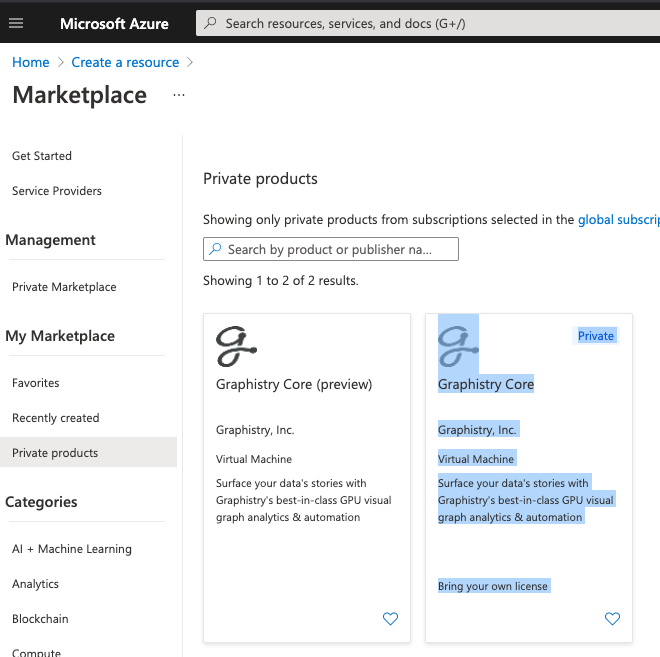
6. Create#
Ensure it is the privage one, which will be labeled

Launch#
The subsequent instructions are the same as regular public Azure Marketplace configuration